← Back to the blog

I Built My App With Lovable. What Happens Next?
A simple application dashboard beside a Build, Launch, Operate, Improve path

You had an idea.

You described it to Lovable.

A few hours or days later, you had something that previously might have required a designer and a developer. You connected your domain, shared the link, and real customers started using it.

Then a new question appeared:

Who makes sure this thing keeps working?

This is not a criticism of Lovable. It is the natural transition from building software to operating software.

AI builders have made software creation much more accessible. Once software becomes part of your business, though, reliability, security, monitoring, data protection, and change management start to matter. The question is no longer only whether you can build a feature. It is whether the business can depend on it.

Lovable changed who can build software

Lovable helps people turn an idea into a working website or application without starting with a blank code editor. You can create an interface, connect a database, add authentication, deploy an application, connect a domain, and iterate quickly.

That is a useful change. A founder can test an idea before hiring a team. A consultant can build a tool for a client. A small business can replace a clumsy manual process with something designed around the way its people actually work.

The important distinction is simple:

Building and operating are different disciplines.

Getting an application to work while you are testing it is one milestone. Keeping it useful when customers sign in at odd hours, payments fail, integrations change, and someone ships the next update is another.

Once customers depend on it, the rules change

Development success often sounds like this:

“It works when I test it.”

Production success sounds more like this:

“It keeps working when customers use it in unpredictable ways.”

Real applications have to deal with expired sessions, payment failures, delayed emails, third-party outages, incorrect permissions, mobile-specific bugs, unexpected input, database mistakes, failed webhooks, and occasional traffic spikes.

The issue is not whether Lovable can support production applications. The issue is whether your application is configured, monitored, and operated appropriately for the job it has to do.

A homepage can load while checkout is broken. The application is technically up; the business is still losing sales. That is why production care needs to look beyond a green status page.

10 questions every Lovable app owner should answer after launch

You do not need an elaborate engineering program to answer these questions. You do need clear answers that match the risk of your business.

1. How will I know if the application is down?

An external uptime check should visit your site independently and alert you when it cannot reach it. For some businesses, email is enough. For an application handling time-sensitive transactions, you may also want SMS or Slack alerts, along with domain and SSL certificate monitoring.

The baseline is straightforward: you should not discover an outage because a customer tells you.

2. How will I know if one important feature is broken?

Uptime is not enough. A site can respond normally while signup, booking, checkout, or a contact form fails.

For the workflows that matter most, use a test that behaves like a user. It can periodically open the page, submit safe test data, and confirm that the expected result occurs. Keep the list short. Start with the one or two actions that would hurt most if they stopped working.

For example:

HomepageCheckout
WorksFails

The application is “up.” The business is still broken.

3. Do users complete the workflows that matter?

Operational monitoring tells you whether the software is alive. Business monitoring tells you whether it is doing its job.

A simple funnel might look like this:

StepPeople
Signup started100
Verification sent98
Verified71
Onboarding completed54
Payment completed48

That drop-off may be expected, or it may reveal a confusing screen, a broken email, or a payment problem. You do not need to track everything. Pick the few outcomes tied directly to the business and review them regularly.

4. What happens when an integration fails?

Your application may rely on Stripe, an email provider, a CRM, a calendar, an SMS service, or another API. Those services occasionally time out or return an error.

Ask what happens next. Does the application retry? Does someone get an alert? Can you see which records failed? Is there a way to reconcile the systems later?

One useful scenario to test is this: if a payment succeeds but the webhook fails, will the application eventually recover? If the answer is unclear, document the behavior before it becomes an urgent customer-support problem.

5. Is customer data actually protected?

Authentication answers, “Who are you?” Authorization answers, “What are you allowed to see or do?” Both matter.

Review user permissions, database access rules, admin functionality, secrets, and the places where personally identifiable information is stored or sent. Check that a normal user cannot view another customer’s records simply by changing an identifier in a URL or request.

If your app handles meaningful customer data, payments, health information, or confidential business information, a production security review is a sensible investment. It should be specific to the application, not a generic list of scary possibilities.

6. Is my data backed up?

Confirm what is backed up, how often it happens, where it is stored, and how you would restore it. Depending on the application, that may include the database, uploaded files, configuration, and key deployment information.

A backup you have never successfully restored is an assumption, not a recovery plan.

The right recovery process depends on the cost of losing data. A small internal tool may need a simpler plan than a customer-facing system with years of records. The goal is proportionate protection, not complexity for its own sake.

7. What happens when I make the next change?

“Improve checkout” sounds like a small request. The change might also affect mobile layouts, analytics, login, database behavior, or another workflow.

Before an important change reaches customers, test the path it is meant to improve and the paths most likely to be affected. Keep a short list of critical workflows and run it after each meaningful release.

AI makes changing software easier. That also makes it easier to change software more often. Frequent change increases the value of simple validation.

8. Who manages dependencies and platform changes?

Applications rely on libraries, APIs, hosting platforms, authentication providers, and integrations. Those dependencies change over time. An update may fix a problem, introduce a new behavior, or require a configuration change.

You do not need somebody watching every release. A periodic technical health check is usually enough for a small application. The review should look at outdated dependencies, expiring credentials, vendor notices, and any changes that could affect the customer journey.

9. What happens if usage increases?

Plan for the next realistic stage, not an imaginary audience of millions. A useful first review asks whether there are obvious bottlenecks, sensible limits, and enough visibility to notice when capacity is getting tight.

If you have hundreds of users today, you probably do not need enterprise infrastructure today. You do need to know what would have to change at the next level of usage and how you will see that moment approaching.

10. Who actually owns everything?

The business should control the accounts and information it would need to keep operating:

AssetSensible owner
DomainThe business
Source codeA business-controlled repository
Customer dataThe business
Payment accountThe business
AnalyticsThe business
Hosting and vendor accountsThe business
Secrets and credentialsThe business, stored securely

This is not about distrusting a founder, contractor, or agency. It is about avoiding a single point of failure. The business should not depend on one person’s personal account to access its domain, code, customer data, or payment system.

How production-ready does your application need to be?

Production readiness is not a switch that is either on or off. It is a level of care that should match what is at stake.

Level 1 — Prototype

Works for me.

This is suitable for demos, idea validation, and internal testing. The main requirement is that the functionality is good enough to learn from.

Level 2 — Launched

Other people can use it.

At this stage, you need a domain, production configuration, basic analytics, and a way to see obvious errors.

Level 3 — Production ready

We know when something important fails.

Typical requirements include monitoring, error visibility, a backup strategy, a security review, and tests for critical workflows.

Level 4 — Operational

Failures have predictable responses.

This usually means alerts, a few practical runbooks, a tested restore procedure, disciplined deployments, and a way to recover from integration failures.

Level 5 — Business critical

The business confidently depends on it.

This may call for service objectives, stronger operational controls, extensive monitoring, mature security practices, capacity planning, and structured incident response.

Most small businesses do not need Level 5. The right goal is enough operational maturity for the actual business risk—not enterprise engineering for its own sake.

You may not need a development team

Hiring engineers may be unnecessary for a small application. Some apps need very little ongoing engineering once they are configured well.

Having nobody responsible for software your customers depend on is a different matter.

You may need a technical owner rather than a development department. That person is accountable for the health of the system and knows when to bring in deeper expertise. The role may include:

  • reviewing application health periodically;
  • ensuring monitoring exists;
  • diagnosing incidents;
  • reviewing significant changes;
  • checking security;
  • validating backups;
  • handling integrations; and
  • advising when the architecture needs to evolve.

The technical owner does not have to personally write every fix. They do need to know what is happening and what decision comes next.

Start with a Production Readiness Review

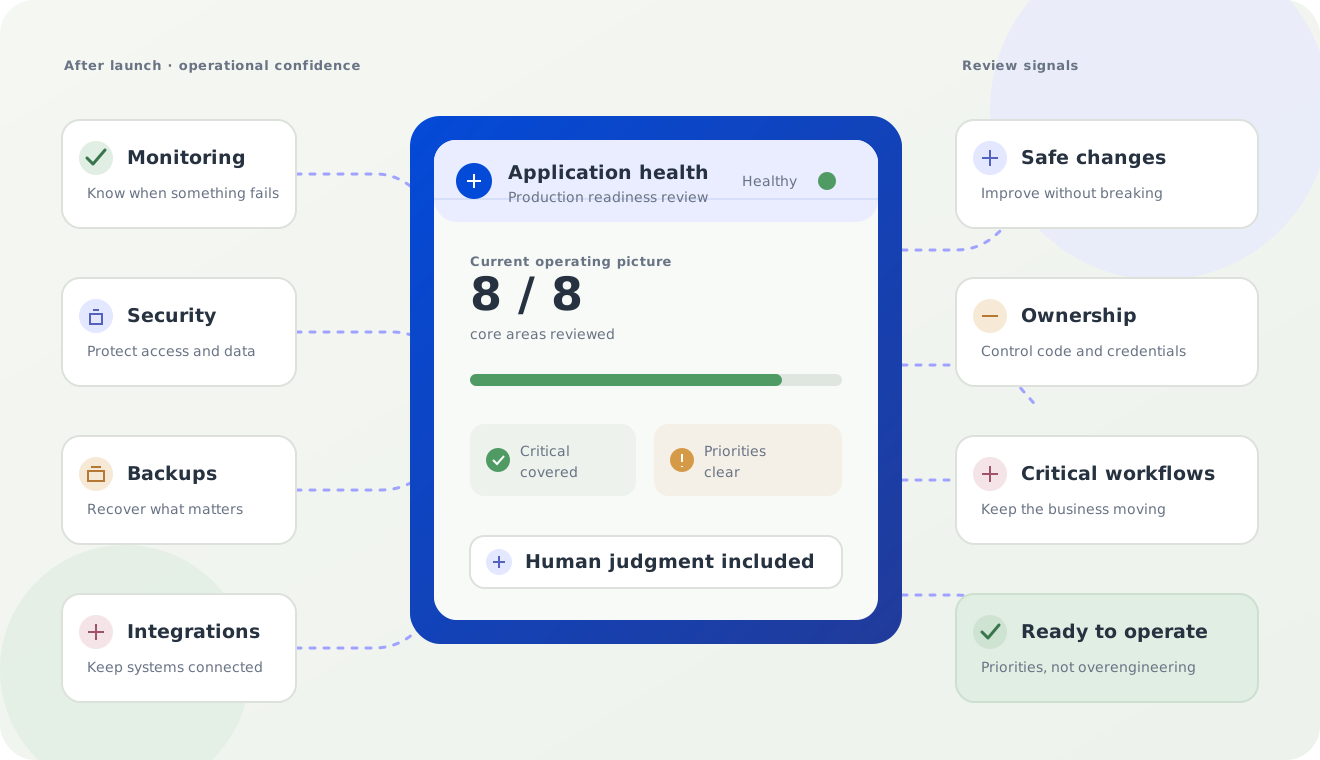
A Production Readiness Review is a practical starting point for an AI-built website or application. The aim is to identify what matters before you depend on the system more heavily—not to turn a small app into an enterprise project.

A review can cover:

  • architecture and production deployment;
  • domain and DNS configuration;
  • authentication and authorization;
  • data protection and secrets;
  • backups and recovery;
  • uptime and error monitoring;
  • critical workflows;
  • integrations and webhooks;
  • analytics;
  • security; and
  • ownership of accounts, code, and data.

Findings should be sorted into four useful categories:

  • Critical: Fix before relying on the application.
  • Important: Address soon.
  • Recommended: Improve as usage grows.
  • Not needed yet: Avoid unnecessary complexity for now.

That last category matters. Good technical judgment includes knowing what can wait.

Review My App

You built it. It still needs a little care

Ongoing app care does not have to mean a large managed service. For the right application, it may be a small, recurring set of checks:

  • uptime and error monitoring;
  • important workflow monitoring;
  • periodic security review;
  • backup verification;
  • dependency maintenance;
  • deployment assistance;
  • production troubleshooting; and
  • small fixes and operational recommendations.

When a problem can be safely diagnosed or handled automatically, automation and AI can help. When judgment matters—especially around security changes, unusual incidents, customer-impacting decisions, and risky deployments—a person should be involved.

Automate what is predictable. Use agents where reasoning helps. Keep people in the loop where judgment matters.

That is the approach we take at Technolz: use the simplest solution that makes the business more dependable.

This problem extends beyond Lovable

The same transition applies to software built with Replit, Bolt, v0, Cursor, Claude Code, and other AI-assisted development tools.

AI is increasing the number of people who can create software. That is good for experimentation and access. It also means more businesses will need practical ways to operate software that was built quickly.

The builder matters less than the role the application plays. Maintenance depends on what the app does, what data it holds, how many people rely on it, and what a failure would cost.

Frequently asked questions

Can a Lovable app be used in production?

Yes. The important question is whether the individual application has been configured and operated appropriately for its actual business requirements.

Do I need a developer to maintain a Lovable app?

Not necessarily. Simple applications may require very little ongoing engineering. Applications handling customers, payments, sensitive data, or important workflows benefit from having someone accountable for operational health.

Should I move my Lovable app to GitHub?

It depends on how important code ownership, collaboration, deployment flexibility, and change management are for your application. The business should understand where the source code lives and retain access to the repository and related accounts.

How much maintenance does a Lovable app require?

Maintenance depends more on what the application does than which builder created it. A simple brochure site and a payment-enabled customer portal have different operational needs.

Built something with Lovable?

Lovable has changed the economics of building software. That is worth embracing.

Once customers rely on what you built, the job changes. You do not necessarily need a large engineering organization. You do need confidence that the application is secure enough, observable enough, recoverable enough, and maintainable enough for the role it plays in your business.

That is what production readiness means.

Get a Production Readiness Review
Related Posts